
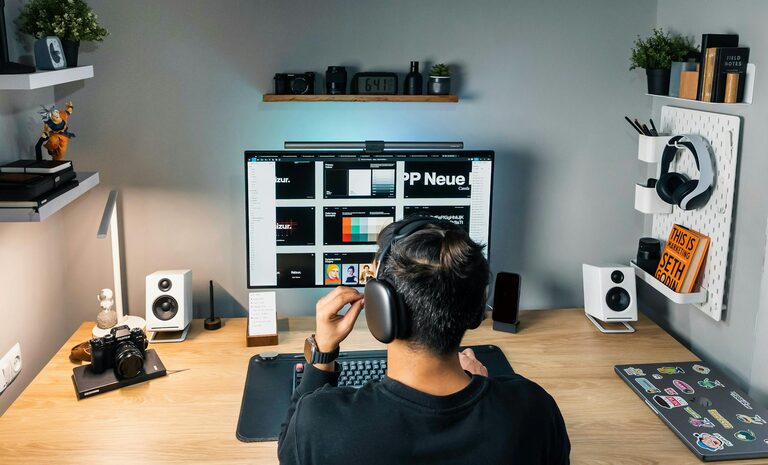
Creating a cozy and productive home office space is essential for anyone working from home or needing a dedicated area for focused tasks. An inviting environment can improve concentration, reduce stress, and make working from home a more enjoyable experience. In this post, we’ll share practical tips to help you design a home office that feels both comfortable and conducive to productivity.
Choose the Right Location
Selecting the best spot for your office sets the foundation for your workspace. Ideally, look for a quiet area with good natural light. If possible, pick a room or a corner away from high-traffic zones to minimize distractions.
Natural Light Matters
Natural light can improve your mood and energy levels. Position your desk near a window to take advantage of daylight. If natural light is limited, invest in quality lighting that mimics daylight to keep your space bright and inviting.
Invest in Comfortable, Functional Furniture
Your furniture plays a big role in comfort and productivity.
– Ergonomic Chair: Choose a chair with lumbar support and adjustable height to maintain good posture.
– Spacious Desk: Ensure your desk offers enough surface area to hold your computer, notebooks, and any other essentials without crowding.
– Desk Accessories: Use monitor stands to position screens at eye level and prevent neck strain.
Personalize with Soft Textures
Adding a cushion or a soft throw to your chair can increase comfort during long work hours. An area rug can add warmth and define your workspace.
Organize for Efficiency
A clutter-free office helps reduce distractions and keeps your mind clear.
– Storage Solutions: Use shelves, filing cabinets, or desk organizers to keep papers and supplies tidy.
– Cable Management: Tidy cables with clips or cable boxes to create a cleaner appearance.
– Daily Declutter: Spend a few minutes at the end of each day clearing your desk to start fresh the next morning.
Incorporate Personal Touches
A space that reflects your personality can boost motivation and enjoyment.
– Decor: Add plants, artwork, or photos that make you smile and inspire creativity.
– Color: Choose soothing or energizing wall colors depending on what helps you focus best.
Set Boundaries and Create a Routine
Working from home requires discipline to maintain productivity.
– Dedicated Work Hours: Set specific start and end times to separate work from personal time.
– Breaks: Take regular breaks to stretch and recharge.
– Distraction Control: Use noise-canceling headphones or white noise machines if needed.
Leverage Technology Wisely
Having the right tools can streamline your work and reduce frustration.
– Reliable Internet: Ensure your internet connection is fast and stable.
– Backup Power: Consider a surge protector or backup battery to avoid interruptions.
– Productivity Apps: Use task managers or calendar apps to stay organized and meet deadlines.
Prioritize Comfort and Wellness
Your physical and emotional well-being is crucial in a home office space.
– Temperature Control: Keep the room at a comfortable temperature with fans or heaters as needed.
– Air Quality: Add plants or air purifiers to maintain fresh air.
– Movement: Incorporate a standing desk or take walking breaks to avoid prolonged sitting.
Final Thoughts
Designing a home office that balances coziness and productivity is about blending comfort with function. It doesn’t require a large space or a big budget—small changes can make a big difference. Remember, the goal is to create an environment where you feel motivated, comfortable, and ready to work efficiently. Take your time experimenting with layouts and decor until you find what works best for you.
With these tips, you’ll be well on your way to building a home office space that supports both your work and well-being. Happy decorating!